FAQ For Travel Agents
-
1. Can I change one passenger if there is more than one passenger in the PNR?
Yes, it’s allowed to change 48 hours before the departure, fare rules applicable. By sending an email to sales@salamair.com, our team will assist with your request.
-
2. What type of refund would I receive when I cancel my ticket?
If it's a normal cancellation before 48 hours, it will be refunded to the travel agent’s account.
Note:
- If PNR is paid by a credit card, the cancellation will be refunded as a voucher.
- If PNR is paid by more than one form of payment, the cancellation will be processed by sending an email to sales@salamair.com
-
3. How to modify my ticket if I receive a flight reschedule notification?
You can modify or cancel your booking through your “portal"
-
4. I issued the ticket with my bank, but it is still not confirmed.
If your payment has been processed but you haven't received confirmation, you must fill out the table below with full details and send it to sales@salamair.com
Online Error Passenger Name Transaction Date: Hold Amount Flight Details with Date: Bank Name Bank Card Last 4 Digits Contact Number Email -
5. How can I make a group booking request?
For group bookings of 10 passengers or more, you can submit a request by sending an email to sales@salamair.com
Please fill out the table below:
Agent TA ID Number Sector Travel Date Flight Number Fare Type No. Of Pax Expected FAre -
6. How can I change the passenger name on a group booking?
You can change the passenger name permitted with a fee of 15/-OMR up to 24 hours before departure flight/time by sending an email to sales@salamair.com
-
7. How can I update the group name from my end?
Yes, you can, through your portal. Please find the below steps to update the names for a group booking from SalamAir portal:
a. The PNR must be paid 100%.
b. All names must be TBA for First and Last name.
c. Enter the PNR and click SEARCH (PNR must be tagged to your TA ID).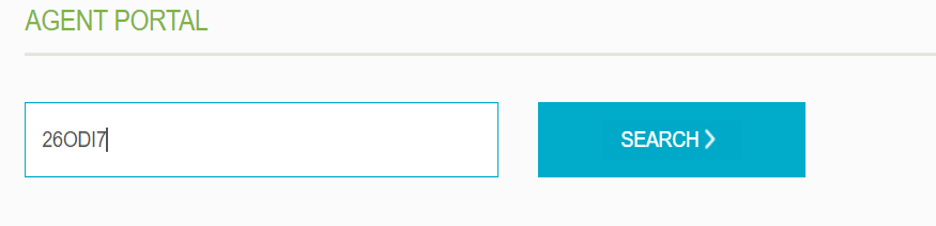
d. Click on the ACTIONS icon:
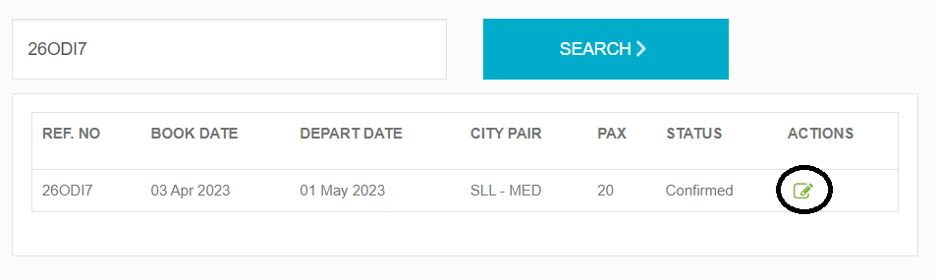
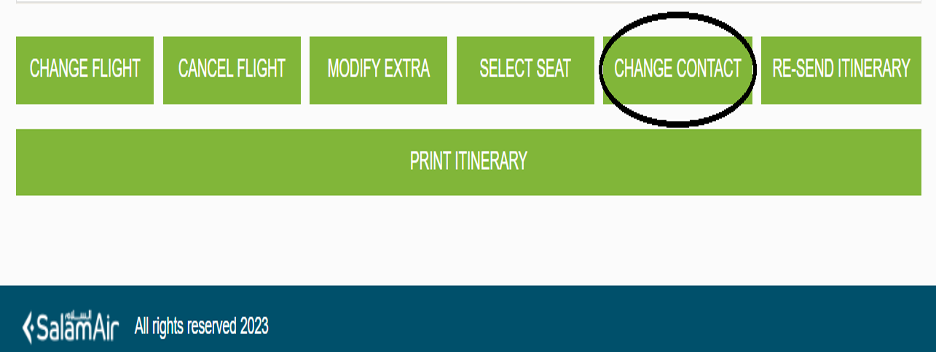
e. Scroll down and click on CHANGE CONTACT:
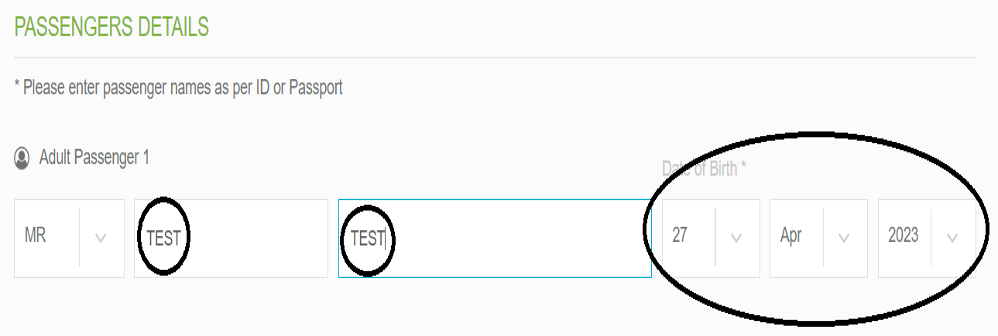
f. Change the name and DOB according to the passport:
g. Scroll down and click CONFIRM:
h. Scroll down and click CONFIRM CHANGES:
Then the inserted names will be updated, and you may print the new booking receipt.
Note: Please save the changes after updating 5 - 10 names, and then complete the rest of the names if there are any.
-
8. I need a wheelchair. What should I do?
Please note that you can request a wheelchair service from the airport check-in counter while boarding.
-
9. Did Salam air need OKTB?
SalamAir does not require OKTB for any destination except for passengers travelling to Iraq.
Make sure travelers hold all the necessary documents.
NOTE: Before arrival, submit the original visa copy at the airport.
-
10. I forgot my password. What should I do?
You can reset the password from your portal or send an email to Sales@salamair.com with complete details as below:
- IATA #
- User ID
- New Password (To be provided by airline)
-
11. I have a new agency; how can I get TA portal access?
You need to fill out the table below & share your commercial registration to create a SalamAir log-in ID.
Please send an email to sales@salamair.com with full details.
SalamAir - Travel Agent Details:
Name of Organisation Contact Details Title First Name Middle Name Last Name Address (Building Name, Street) City P.O. Box ZIP / Postal Code Country Currency Preferred Language Email Contact Phone 1 Contact Phone 2 -
12. If I book a round-trip ticket and I am not using my departure, can I use the return?
If you do not use the outbound flight, you can use the return flight.
-
13. Can I take my TV above 44 inches?
SalamAir accepts LCD/LED TVs with a screen size up to 55 inches. TVs 42 inches and below will be free of charge. TVs above 42 inches will incur a charge of 23.000 OMR.
Note: Maximum size 55 inches, anything larger will not be accepted.
-
14. How to top up my account above 1000 OMR?
You can add above 1000 OMR by depositing the amount directly to SalamAir account and sending confirmation receipt to revenue.accounting@salamair.com. (for Oman market only)
-
15. How much minimum amount can be top-up to my account?
You can TOP-UP at a minimum of 100 OMR through SalamAir portal.
-
16. Can an unaccompanied minor (child) travel alone?
- Yes, a child above 12 years can travel alone.
- The child must travel alone and cannot travel with his sibling who is less than 12 years old.
-
17. How can I add privileges to my user?
You must send an email to Sales@salamair.com to add any privileges.
-
18. I booked the wrong date. What should I do?
You can modify your booking through your "portal " fare rules will be applied.
-
19. How many KG can a passenger take for each destination?
All destinations maximum KG is 50 KG per passenger, except (CGP, DAC, CCJ & LKO), maximum KG is 40 KG per passenger.
-
20. I booked the wrong sector; how can I correct my ticket?
SalamAir does not allow rerouting tickets, if you have booked the wrong sector, you may need to cancel your existing booking with fare rules penalty and create a new reservation.
-
21. How much is the voucher validity?
- Voucher travel validity -1 year from the cancellation date.
- Voucher booking validity - 4 months from the cancellation date.
-
22. Can I cancel my voucher and refund it as cash?
It is not possible to refund as cash once a voucher is issued.
-
23. How do I add a child to my reservation?
Yes, you can send an email to Sales@salamair.com, and our team will assist you.
-
24. How do I add an Infant to my reservation?
You can add an Infant from your portal.
-
25. How can I change my meals or seats?
It is not possible once you confirm the booking.
-
26. How many pieces can I take when I travel?
- 20 KG (1 piece).
- 30 KG (1 piece).
- 40 KG and above can take (2 pieces).
a. Hand Baggage
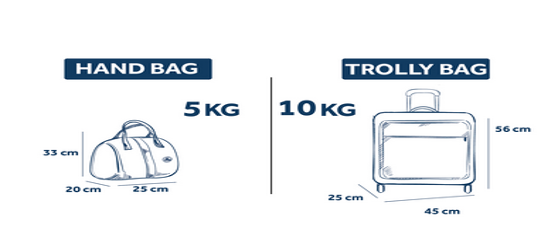
SalamAir's hand baggage allowance is one piece of 5kg (under the aircraft seat), with dimensions not exceeding (25cm x 33cm x 20cm). This allowance includes one small laptop bag, one small plastic bag, or one small ladies` bag. If you need to carry more than 5 kg onboard, you will have to purchase a “Priority” service, which offers an extra 10 kg for a Trolly bag onboard that does not exceed the dimensions (56cm x 45cm x 25cm).
b. Checked Baggage
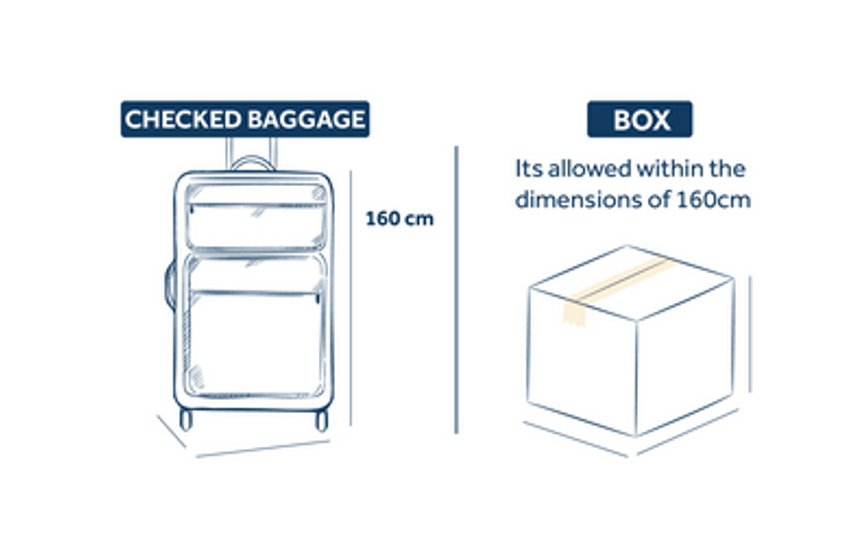
SalamAir offers you a variety of baggage allowances that comply with your travel plan. Upon check-in, ensure that your check-in baggage weight, size, and number do not exceed your booked baggage allowance. The number of checked baggage per passenger is limited to 1 piece if your baggage allowance is 10kg, 20kg, or 30kg, and 2 pieces if your baggage allowance is 40kg. Each piece should not exceed 32kgs within the dimensions of 160cm (W+D+L). Any extra weight, extra pieces, or oversized baggage, or odd-shaped baggage will be subject to space availability in the aircraft, and related charges will apply. Read more about SalamAir’s extra baggage information.
Upon check-in, your baggage will be labelled with an airline tag, which will declare all your baggage details. The baggage claim portion will be mandatory for any future claims (if any).
Contents such as jewelry, perishable, fragile, and all precious items are carried under the full responsibility of the passenger unless they were declared in writing during check-in.
-
27. What is the Group Booking Policy by SalamAir?
a. Group fare quotation valid for 24 hours only from the time of quotation provided.
b. The minimum Group size is 10 seats.
c. Date change is permitted for 10% of the group size up to 7 days before departure with 20/- OMR plus fare difference (if any).
d. Name update must be done up to 48 hours before departure.
e. Name change is permitted with a fee of 15/-OMR before 24 hours of flight departure.
f. Cancellation is permitted for 10% of the group size up to 7 days before the departure with a charge of 25/- per passenger per sector.
Payment terms:
- 25% advance payment at PNR creation must be paid – Non-refundable.
- 25% additional advance payment if the departure date is within 21 days – Non-refundable.
- 50%- 14 days before departure, otherwise the group will be cancelled with No Refund.
- Any Group Request received within 14 days of travel, 100% advance.
Note: Seats are subject to availability
The group booking will be auto-cancelled with no refund if not paid 100% before 14 days of flight departure.
-
28. Is there any fee for online wallet top-ups?
No, all online top-ups are now completely free of charge (0%). Travel agents can instantly and conveniently top up their accounts anytime without needing to contact the SalamAir finance team. This update saves time, simplifies the process, and eliminates additional fees—making account management easier and more efficient.
-
29. Will there be any admin fees for TA Portal bookings?
Yes, a new administrative fee per booking will be introduced on the Trade Agent (TA) portal. This fee will be borne by the customer.
-
30. What changes have been made to the ‘Manage My Booking’ process?
We’ve introduced several enhancements to make managing bookings easier:
- When a customer changes their flight date, all previously purchased ancillary services (such as baggage and meals) will automatically transfer to the new flight.
- Seat selections are not transferred automatically and will need to be reassigned manually if any changes are made.
- Agents can now add additional baggage to a booking (not just upgrade existing baggage). The total baggage weight must not exceed the passenger’s maximum allowance.